> For the complete documentation index, see [llms.txt](https://docs.podplay.app/llms.txt). Markdown versions of documentation pages are available by appending `.md` to page URLs; this page is available as [Markdown](https://docs.podplay.app/events/create-an-event/external-event-links.md).
# External Event Links
### Overview
Some Events are not booked inside PodPlay. A Club may run a Tournament on Eventbrite, collect waivers on its own form, or take payment through another registration tool. External Event Links replace the Sign Up button on an Event's public page with a button you name, pointing at a URL you choose. The Event still appears in your listings, and registration happens on the outside site.
{% hint style="info" %}
**This feature must be enabled for your Club.** If you do not see the setting in Company Settings, or the External Link section on an Event, contact Customer Success team.
{% endhint %}
### Turn on External Event Links
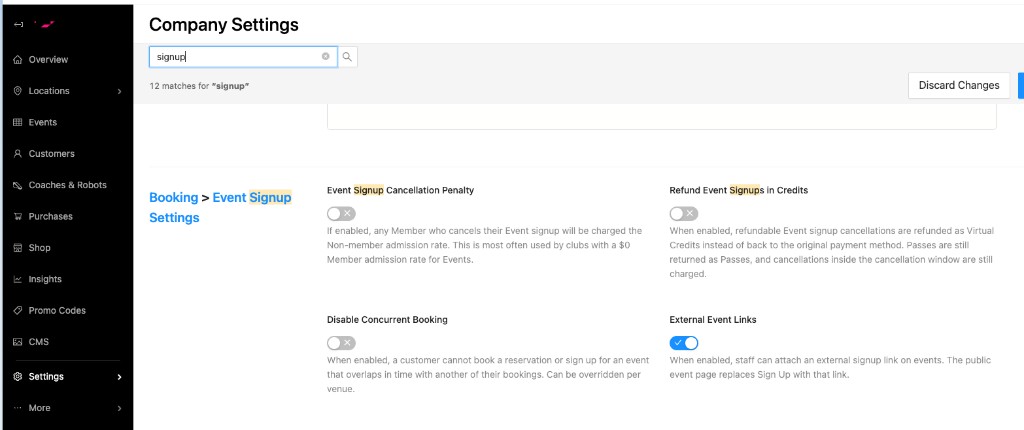
1. Open Company Settings.
2. Go to the Booking tab.
3. Find Event Signup Settings.
4. Turn on External Event Links.
5. Save.
The setting is off by default. Once it is on, staff can add an external link when they create or edit an Event.
### Add an external link to an Event
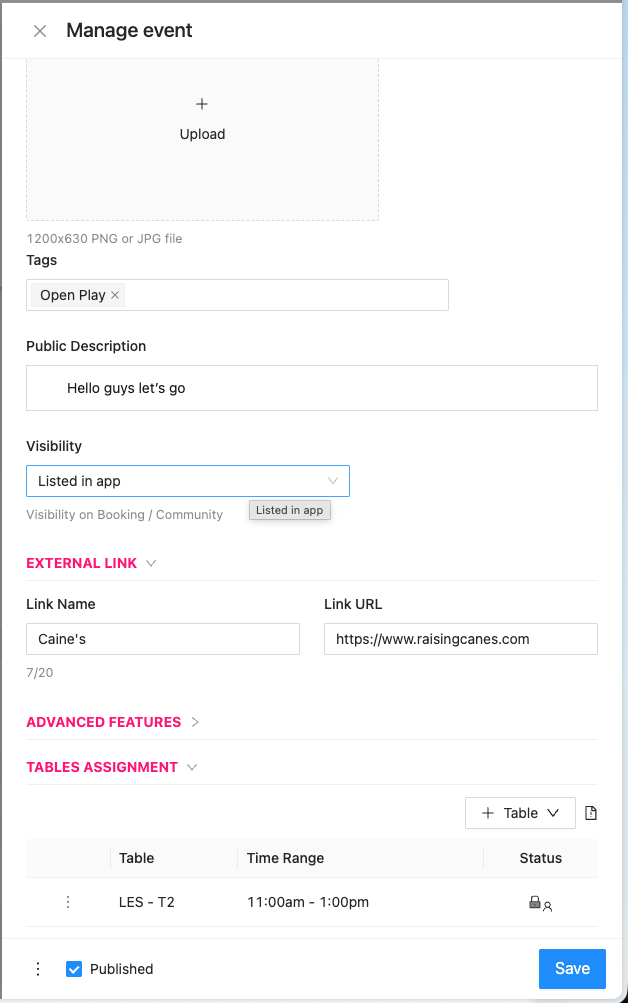
1. Open the Event in the Dashboard. Create a new Event, or edit an existing one.
2. Expand the External Link section. It sits above Advanced Features and is collapsed by default.
3. Enter a Link Name. This is the button label Customers see, up to 20 characters. Example: `Register on Eventbrite`
4. Enter a Link URL. This is where the button goes. Example: `https://example.com/register`
5. Save the Event.
{% hint style="warning" %}
**Both fields are required together.** Fill in Link Name and Link URL, or leave both empty. A save with only one field filled in is blocked.
{% endhint %}
### What Customers see
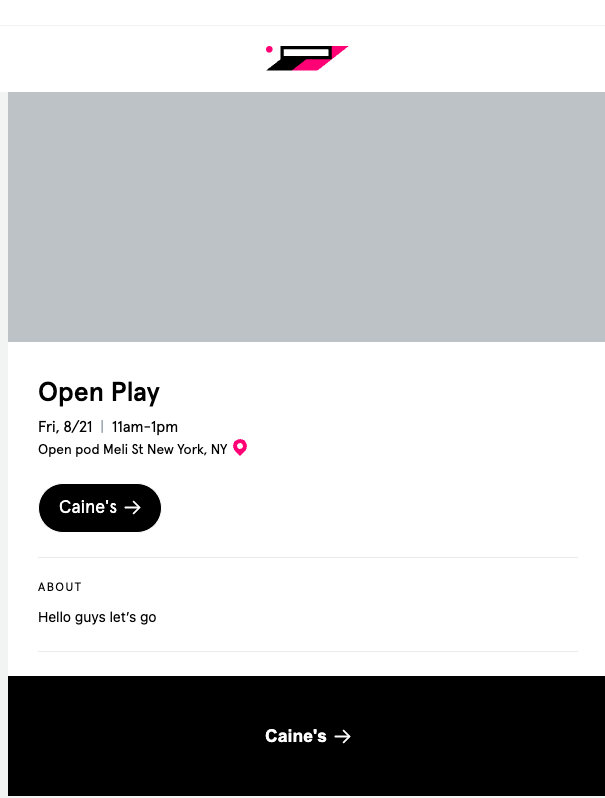
On the public Event page:
* The Sign Up button at the top of the page and the Sign Up button at the bottom of the page both become your Link Name.
* Either button opens the Link URL in a new browser tab. In the App the link opens outside the App, in the Customer's native browser.
* The Price and Signups row is removed from the page.
* Signup and payment for that Event happen on the outside site, not in PodPlay. PodPlay records no participants, no roster, and no payment for the Event.
### Rules and edge cases
#### Events that already have PodPlay signups
Set or change the external link before any Customer signs up in PodPlay. After an Event has one or more PodPlay signups, the Link Name and Link URL fields are disabled and the Dashboard shows this message:
> External Links cannot be added to an event if it has any sign-ups.
The lock protects Customers who already signed up in PodPlay. Sending them to an outside site would leave their PodPlay signup stranded.
#### Clear a link
To remove the external button, clear both Link Name and Link URL, then save. The Event must still have no PodPlay signups.
#### Turn the feature off
If you turn External Event Links off in Company Settings, the custom button is hidden even when a link is still saved on the Event. Normal PodPlay signup returns to the Event page. Turn the setting back on and the saved link appears again. You do not re-enter it.
#### Series Events
On an Event that belongs to a Series, the External Link fields may be locked when you edit a single occurrence. Set the link when you create the Event. Or update the occurrences with your usual Series save options while the fields are editable.
### Tips
* Write a Link Name that tells Customers they are leaving PodPlay, for example `Register on Eventbrite`.
* Use a full `https://` URL so the button opens reliably.
* Use External Event Links when registration, waivers, or payment must happen on another platform. Use normal PodPlay signup when you want attendees, waitlists, and payments managed in the Dashboard.
---
# Agent Instructions
This documentation is published with GitBook. GitBook is the documentation platform designed so that both humans and AI agents can read, navigate, and reason over technical content effectively. Learn more at gitbook.com.
## Querying This Documentation
If you need additional information that is not directly available in this page, you can query the documentation dynamically by asking a question.
Perform an HTTP GET request on the current page URL with the `ask` query parameter, and the optional `goal` query parameter:
```
GET https://docs.podplay.app/events/create-an-event/external-event-links.md?ask=&goal=
```
`ask` is the immediate question: it should be specific, self-contained, and written in natural language.
`goal` is optional and describes the broader end goal you are ultimately trying to accomplish on behalf of the user. GitBook uses it to tailor the answer towards what is most useful for that goal.
The response will contain a direct answer to the question and relevant excerpts and sources from the documentation.
Use this mechanism when the answer is not explicitly present in the current page, you need clarification or additional context, or you want to retrieve related documentation sections.